
Analyze the verbatims of your other channels
Bring call summaries and other free texts into Goodays, without adding work for your pro users.
Your end customers do not only talk to you through your Goodays surveys. Your call center writes a summary after each phone survey, your sales team logs what customers tell them, another tool collects comments...
These texts are often richer than a survey verbatim, but nobody is expected to reply to them. This case shows how to bring them into Goodays so that they feed your statistics and analyses, without filling the Inbox of your pro users.
An example
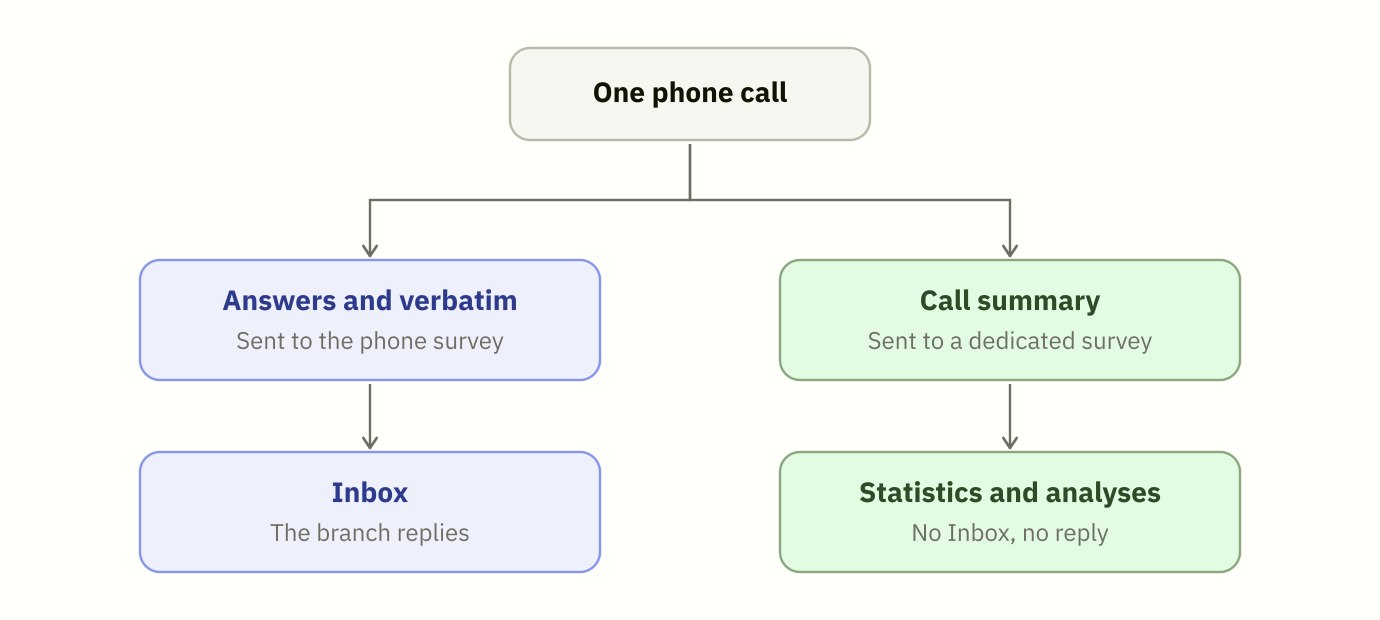
Dunder Mifflin runs a phone satisfaction survey with a call center. For each call:
- The call center sends the answers of the end customer with their verbatim. This participation is processed as usual: it appears in the Inbox of the branch, which replies to the end customer.
- At the end of the call, the call center tool writes a summary of the conversation, for example:
"The customer is very satisfied with the branch. He highlights the quick quotes and the next-day delivery. He orders through the website, which he finds easy to use, and would like to receive delivery updates by text message."
Dunder Mifflin wants to analyze these summaries with the rest of its feedback. But a branch manager should not have to reply to them, and they should not count twice in the satisfaction scores of the phone survey.
The setup
1. A dedicated survey
Ask your Goodays project contact to create a survey for the summaries, for example "Phone survey - Call summaries". Your Goodays project contact sets it up so that its participations never enter the Inbox, raise no alert and send no notification.
Because it is a separate survey, the summaries:
- do not change the scores of your phone survey,
- can be filtered on their own in your statistics and analyses.
Wait for the setup before your first callThe setup is done by Goodays on this survey. Until your Goodays project contact confirms it is done, a summary sent to this survey is processed like any other participation: it enters the Inbox of your pro users and can raise alerts and notifications.
2. One call per summary
Send each summary with the live import, as a participation with a verbatim only: an empty answers list, and the summary in message.
curl --location --request POST 'https://api.goodays.co/v2/responses/live?use_workflows=true' \
--header 'Content-Type: application/json' \
--header 'Authorization: 1234abcd1234abcd1234abcd1234abcd' \
--data-raw '{
  "date": "2026-09-23T10:32:00+02:00",
  "user": {
    "email": "[email protected]",
    "first_name": "Stanley",
    "last_name": "Hudson",
    "phone": "",
    "crm_id": "CLI-1977"
  },
  "context": {
    "market": "Paper wholesale"
  },
  "place": "SCR-001",
  "survey": "k8xWQ2Mo4Y",
  "answers": [],
  "message": {
    "created_date": "2026-09-23T10:32:00+02:00",
    "type": "NoType",
    "content": "The customer is very satisfied with the branch. He highlights the quick quotes and the next-day delivery..."
  },
  "medium": "TE",
  "collect_uid": "CALL-260701984-summary"
}'
A few tips:
use_workflows=true: keep it in the URL for this use case. Only send it with the valuetrue: when you do not need it, leave it out of the URL rather than sendinguse_workflows=false.place: send the point of sale the call is about, so that each branch can see the summaries of its own customers.date: the date of the call, not the date of the sending.message.type: the field is mandatory. You can derive it from the rating of the call, with the same rule for all summaries: for exampleProblemfor a low rating andPraisefor a high one. If you cannot, sendNoType: nobody replies to the summaries, so they do not need a remark type.user:emailandfirst_nameare mandatory to send a verbatim. If the end customer stayed anonymous, do not send the summary.collect_uid: reuse the identifier of the call with a suffix, so that a summary can never be sent twice.context: add the same custom parameters as for the survey answers (market, segment, region...), so that you can filter the summaries the same way.
What your pro users see
The summaries do not appear in the Inbox and cannot be replied to. Pro users can still find them when they search participations on their points of sale, and open them from your analyses.
Before you start
- Send a few summaries first and check them with your Goodays project contact before sending your full volume.
- Write the summaries as close as possible to what the end customer said. The analysis works best on texts that keep the words of the end customer.
Updated about 18 hours ago