
Live or historical import
Choose the right endpoint to send participations to Goodays.
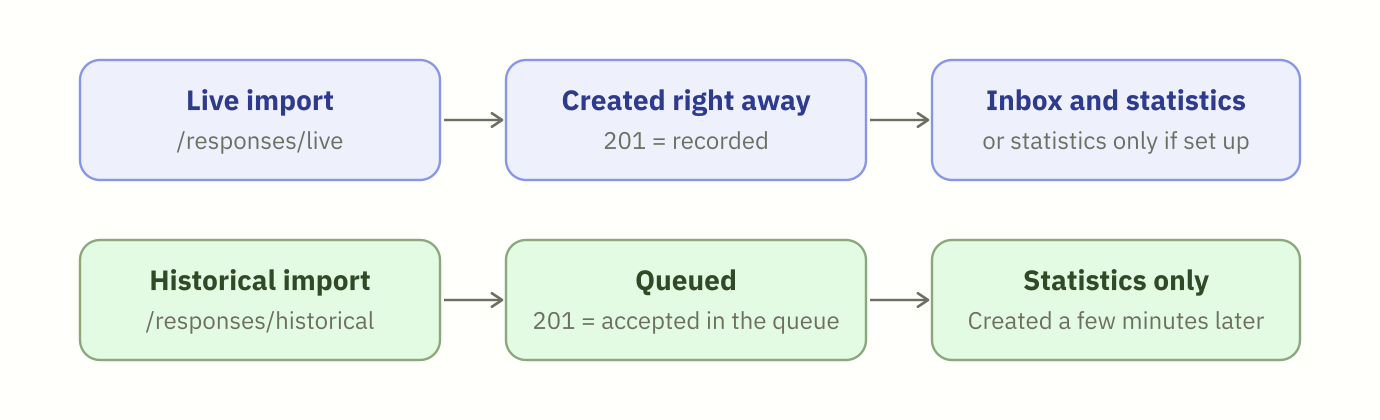
You can send participations to Goodays in two ways: as they happen (live import), or in bulk to bring your past data into Goodays (historical import). Both use the same payload: only the endpoint changes.
Which endpoint should I use?
| Live import | Historical import | |
|---|---|---|
| Endpoint | POST /responses/live | POST /responses/historical |
| Use it for | Participations collected by your own tools (kiosk, app, call center...), sent as soon as they are collected | Participations collected before you joined Goodays, or by another partner |
| Payload | See Become a collection source | Same payload |
| When is the participation created? | Right away. A "201" means it is recorded | A few minutes later: it is queued first. A "201" means it is accepted in the queue |
| Errors | Returned in the response of the call | Payload errors are returned in the response of the call |
| Processing | Like any participation collected by Goodays: Inbox, dissatisfaction alerts, notifications and statistics. A dedicated survey can be set up to feed statistics and analyses only (see below) | Statistics only: never in the Inbox, no alert, no notification |
date field | Date of the participation of the end customer | Date of the participation of the end customer, not the date of the import |
| Duplicates | Rejected with a 409 when the collect_uid already exists | Rejected with a 409 when the collect_uid already exists |
Endpoint namesThese endpoints used to have shorter names, which remain available and behave exactly the same way:
New name Previous name, still available POST /responses/livePOST /responses/collectPOST /responses/historicalPOST /responsesIf you already use the previous names, nothing changes for you. You can switch to the new names whenever it suits you.
Content that nobody should reply to
Some participations are not meant to be answered by your pro users: a summary written by your call center after a phone survey, a transcript, a comment from another tool...
For this kind of content, use the live import with a dedicated survey. Your Goodays project contact sets up this survey so that its participations:
- never enter the Inbox and cannot be replied to,
- raise no dissatisfaction alert and send no notification,
- still feed your statistics and your analyses.
Ask your Goodays project contact before sending this kind of content, so that the survey is ready. See Analyze the verbatims of your other channels for a complete example.
Good practices
- Always send a
collect_uid. It protects you from duplicates if a call is sent twice, for example after a network error or when you send a file again. - Send the real date of the participation in
date, even for a live import sent a few days later. Your statistics and exports are based on this date. - Test on a test point of sale first. Ask your Goodays project contact for one, and check the result in the Goodays back office before sending your full volume.
Updated about 18 hours ago